// remove result count site-wide
function woocommerce_result_count() {
        return;
}

WordPress and Genesis Theme Tips, Tricks, Tutorials and Code Snippets
Tuesday, 15 March 2016
WooCommerce remove Showing x Results - Shop Page
To remove the "Showing x Results" from WooCommerce site wide paste the following code in your theme functions.php.

WooCommerce Remove Default Sorting - Shop Page
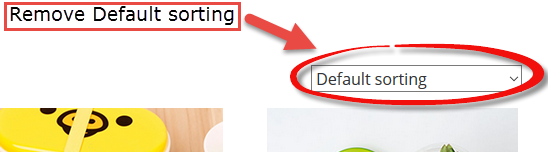 |
| Remove WooCommerce Default Sorting Dropdown Select |
To Remove "Default Sorting" on WooCOmmerce shop page. We will remove "woocommerce_catalog_ordering" from "woocommerce_before_shop_loop" hook. Dont forge to add the $priority value in the action hook which is "30" in this hook.
remove_action( 'woocommerce_before_shop_loop', 'woocommerce_catalog_ordering', 30 );Paste the above code in your themes functions.php file to remove "Sort By" dropdown select from the shop page in WooCommerce.
Thursday, 11 June 2015
Remove Genesis Header
To remove Genesis header we can simply use "genesis_header" hook to remove "genesis_do_header" function. Use the code in your functions.php or in a specific page template where you want to modify your header.
For Example :
/*
 * Remove Genesis Header
========================================*/

remove_action( 'genesis_header', 'genesis_header_markup_open', 5 );
remove_action( 'genesis_header', 'genesis_do_header' );
remove_action( 'genesis_header', 'genesis_header_markup_close', 15 );
if you want to use custom header and want to add header image you can use the following code to hook again to the "genesis_header" and add your custom functions. Place the code in your functions.php
  /*
 * Add custom header Image.
========================================*/

add_action( 'genesis_header', 'aam_genesis_header' );
function aam_genesis_header() {
 /**
  * Get header image
  * @type string
  */
 $am_header_image = get_header_image();
 if ( $am_header_image != '' ) {
    echo '
    <a href="'.get_home_url( '/' ).'">
  <div class="custom-header-wrap">
   <img src="'.$am_header_image.'" title="'.get_bloginfo( 'name' ).'">
  </div>
  </a>';
 } else {
  echo '
  <div class="wrap">
   <div class="title-area">
    <h1 class="site-title" itemprop="headline">
    <a href="'.get_home_url( '/' ).'">'.get_bloginfo( 'name' ).'</a>
    </h1>
   </div>
  </div>';
 }
}
Monday, 30 September 2013
Icon Fonts in Genesis - Child Theme
 |
| Icon fonts in Genesis Framework - Child Theme - Font Awesome |
Icon fonts are great in now a days web design and development. a lot of new theme and css frameworks are coming with great features and much more easy to design and develop a new website or theme from scratch.
I believe icons speak what words can not and that is why I always use them in my theme instead of adding content every where we should add icons to make our design look elegant.
Sunday, 8 September 2013
Force Full width and add custom content in Genesis Page Template

Recently I have published a post Custom Page Template in Genesis Child Theme and figured some people still have the problem to work with custom page templates.
Friday, 14 June 2013
Custom sidebar for single product view in Genesis / WooCommerce

While working on a client site. He offered me to create a separate sidebar for a single product view in genesis. He wanted to load different widgets when single product is viewed. The tool used on the site for shopping cart was "WooCommerce"
First I went to the plugin and open it in editor and hard coded the sidebar which I registered in the functions.php
Saturday, 8 June 2013
Add theme support for Custom Background
 |
| add_theme_support - custom_background |
Custom Background in your WordPress Theme is a theme feature that allows you to change the background color or add background image to the Theme.
Sunday, 14 April 2013
Custom Page Template in Genesis Child Theme - Page Layouts

Saturday, 13 April 2013
Genesis Actions Hooks & Filters

To work with Genesis Framework on WordPress you should know about Genesis Actions Hooks & Filters Hooks. How to filter content placed in different hooks, and how to add elements using those hooks which are built in Genesis Framework. You can use the Plugin to see all of the Actions
Thursday, 11 April 2013
Showcase WordPress Ultimage Image Gallery - Nivo Gallery

I recently found a chance to built a gaming website using WordPress. I created custom post type for the games, some categories of the developers, games, & some meta boxes to show the price & size of the Game.
Saturday, 6 April 2013
Genesis WordPress Framework

Hi, I am going to introduce you with a powerful WordPress framework that allows you to create everything quickly. Genesis is created by StudioPress.Com . Genesis Framework empowers you to quickly
and easily build incredible websites with WordPress.
Sunday, 6 January 2013
How to Create Wordpress Theme from Scratch

Hi, I am Aamer Shahzad, a wordpress theme developer.for the last few years i have been creating wordpress themes from scratch. I do not create quality themes may be you like my themes or not but I found it is hard to brows on internet to search for the tutorial who guide us to create the complete wordpress theme from scratch.
Saturday, 5 January 2013
Creating Wordpress Theme Layout - Baisc Structure

Before we take start to create wordpress theme layout let me share some Web Tools, I use Macromedia Dreamweavr, PHP Designer 7 and Sublime Text Editor. The CSS framework which we are going to use is Foundation. The basic layout.
Friday, 4 January 2013
Creating Wordpress Theme Layout - CSS Styling
In the previous tutorial we successfully have created the wordpress basic HTML markup, now we need to style it little bit. first we will add a dummy CSS to give heights to the wrappers.
I have added a texture background in the image folder. I will use that for background
Subscribe to:
Posts (Atom)